
Anthropic just put free money on the table — and most people haven’t noticed yet. Every active Claude subscriber right now has an unclaimed credit sitting in their account, equal to exactly what they paid for their current plan. Max plan users are looking at $100–$200. Pro plan users get $20. You have until April 17, 2026 to claim it, after which it disappears.
This is a one-time deal. It takes about 30 seconds to redeem. Here’s everything you need to know.
Before we dive in — if you want to become a Claude Code pro and build any project from scratch with zero coding experience, check out the vibe.lab vibecoding course. It covers everything from first install to shipping production-ready apps.
What You’re Getting
The credit is equal to your monthly subscription price — no math required, Anthropic does the calculation automatically based on your plan.
- Max plan ($100/month): $100 credit
- Max plan ($200/month): $200 credit
- Pro plan ($20/month): $20 credit
Once claimed, the credit is valid for 90 days and works across everything connected to your account: Claude Code, Claude.ai chat, Claude Cowork, and any third-party tool or harness that’s wired up to your Claude account. Whether you’re burning through tokens building apps in Claude Code or just having long research sessions in the browser, the credit covers it all.
How to Claim It (Step by Step)
Follow all five steps — the first and last are the ones most people miss.
- Go to claude.ai/settings/usage and switch “Extra usage” ON — the redemption banner may not appear unless extra usage is enabled first
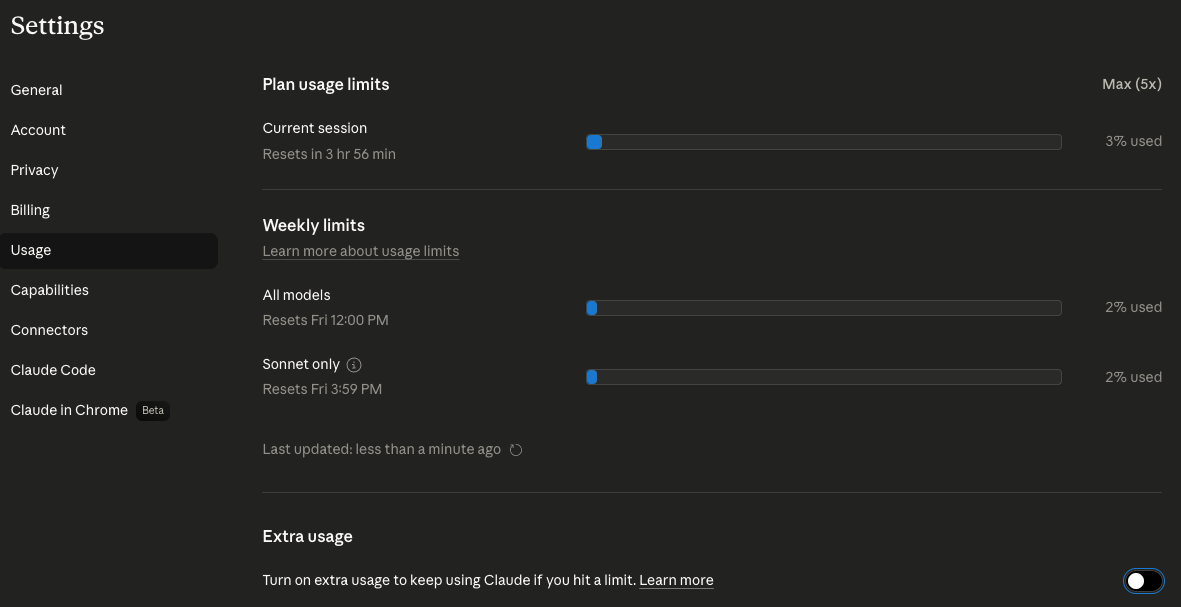
- Look for the credit offer — it appears as a banner or card at the top of the page
- Click “Redeem” — the credit is applied immediately, no promo code or checkout needed
- Done — the credit is now in your account, valid for 90 days
- Immediately scroll back down to “Extra usage” and switch it OFF
Step 5 is critical. Redeeming keeps extra usage billing on — so the moment your free credit runs out, Claude starts charging your card at standard overage rates with no further warning. Switching it off takes two seconds and keeps you in control.
Make sure you’re logged in to the account tied to your active subscription. If you have multiple accounts, double-check you’re on the right one.
Do This Immediately After Claiming (Life Hack)
The moment you hit “Redeem,” Anthropic automatically switches on “extra usage” billing on your account. This is by design — it keeps you from hitting a wall mid-session. But it also means once your free credit runs out, you’ll be charged at standard overage rates without any additional warning.
That toggle in the step above — make sure it’s off before you close the tab. It takes two seconds and could save you real money. The free credit gives you 90 days of bonus usage; extra usage billing kicks in the moment that credit is exhausted and starts charging your card.
If you’re a heavy Claude Code user building real projects, you may want extra usage on — but that should be your conscious choice, not a default that got quietly enabled during a redemption flow.
The New Usage Bundles
Alongside the free credit announcement, Anthropic also launched pre-purchase usage bundles — a way to buy extra Claude usage in advance at up to 30% off the standard overage rate.
The idea: instead of getting charged at full price when you blow past your subscription limits mid-session, you top up ahead of time at a discount. For heavy Claude Code users — the kind running multi-hour agentic sessions, building full projects in one go — this is meaningful savings.
We covered the full context of how Claude Code sessions consume tokens in our breakdown of Claude Code computer use. The short version: agentic tasks burn through context fast, and if you’re doing real work with Claude Code, you will hit limits.
The bundles are available at claude.ai/settings/usage in the same section as the free credit. Pricing tiers aren’t published in detail yet, but the 30% discount claim comes directly from Anthropic’s announcement. For vibe coders who are already paying for Max plan and regularly hitting limits, this is worth checking before your next big build session.